


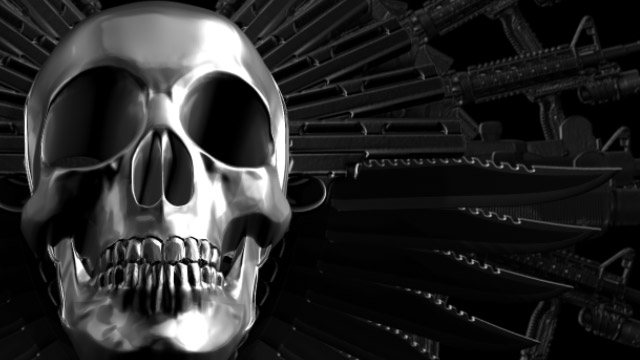
Expendables 2 Title Sequence Done Entirely In After Effects Using ShapeShifter AE
Guns, knives and a skull… this title sequence has it all! And yes, this sequence is created entirely in After Effects, with ShapeShifter Ae. Sequence by Ae power user and ShapeShifter Developer Chris Bobotis. Pretty impressive, if we do say so ourselves. The sequence looks complex, but it’s remarkably easy to create. Tutorial in the works!
Important info: ShapeShifter AE (Mac version) for CS6 is currently in Beta. ShapeShifter AE (Windows version) is currently available. Any purchase of ShapeShifter AE for CS5 and CS5.5 will be given an automatic upgrade to ShapeShifter AE for CS6 when it is launched. Please get in touch with us to get the CS6 version.


Slik
this is way better than the expendables 2 title…..Nice work
comicriminal
some cool sh*t. renderpass for the skull? or what? how you do that in AE?
chris
@comicriminal
Thanks. No render passes from 3d apps…all done in After Effects using ShapeShifter AE. Tutorial in the works … stay tuned.
Cheers,
Chris
mettle.com
graphix676
ooooooohhhh. guns and a skull. mmmmm. 0x0
gfxman
Looks very cool. Can’t wait to see the tut.
Yodabarks
One question…. How did you get the skull to have so much detail?
chris
@Yodabarks
In this case, the 3d displacement was created in Photoshop but you could just as easily use a depth map from any 3D program for this.
Tutorial in the works. Stay tuned.
Cheers,
Chris
mettle.com