Description
Transform an After Effects layer into: terrain, morphing organic shapes, an array of primitives, water simulation and more! Also great for character animation.
Three main tool sets: Mesh Warp, Displacement Mapping and Render Primitives.
360° compatible with Integrated Immersive Tools in CC 2018+.
Compatible with GEOLayers3 plugin.
MEC: Mettle Exclusive Content. Project files available in your customer account.
Sample Clips Made With Version 1.75
FreeForm Pro: The Ultimate Guide by Chris Lavelle.
Compare FreeForm to FreeForm Pro: Click on the images below to see the Effect Control Panels.
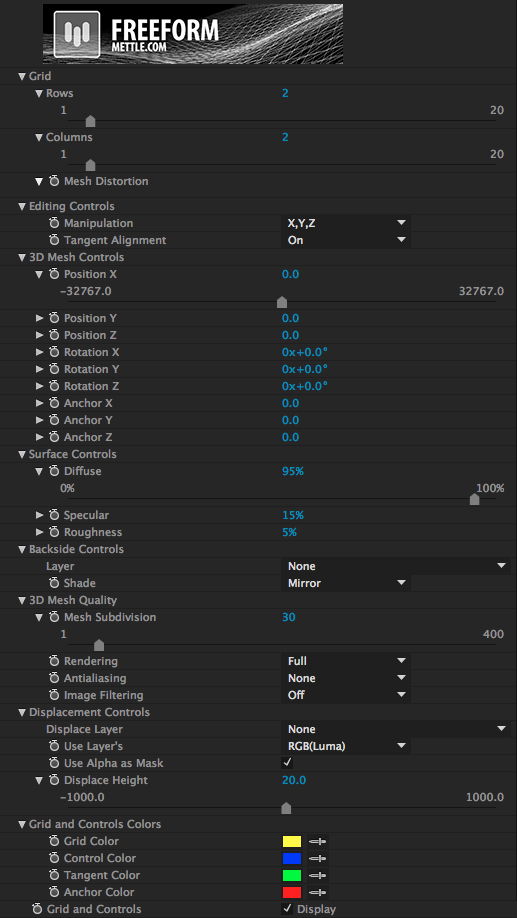
FreeForm

FreeForm Pro
LATEST FEATURES FOR V1.8
PRIMITIVES
Transform your layer into an array of primitives: Cubes, Tetrahedrons, Octahedrons, Icosahedrons, Rods and Planes.
Controls to Amplify Scale and Rotation via luminance values in height maps.
Assign Ae layers (including animated pre-comps) as a texture.
Time Sampling Controls (Random Still Frame & Random Loop).
Transform Controls: Scale, Rotation and Anchor Point (X,Y,Z).
Randomize Postion and Rotation (X,Y,Z).
SKYDOME
Display and render a separate Environment Map or use your Reflection Map as the background.
Field of View Controls.
Mist and Fog are cast onto SkyDome Background.
OPTIMIZED FOR AE 2015
NEW DISPLACEMENT MAPPING CONTROLS
Displacement Bias and Smooth Normals
SCREEN SPACE REFRACTION
CONTOUR OPTIMIZED
Pre-Blur: Texture Map and/or Displacement Map.
Enhanced support of Alpha Channels – Use Texture Layer’s Alpha and/or Displacement Layers Alpha.
NEW RENDER OPTIONS
Normals, UV, Shadows, X-ray and Points.
Shadows cast on Normals and UV.
NEW GENERATOR CONTROLS
Mirror to extend your layer on the X, Y or X/Y.
New Grid Distribution System: Grid X, Y, Z + Grid Offset: X, Y, Z.
3D MESH WARP
Bend and distort on x, y, z. Add up to 400 control points on a single mesh layer, and control and animate each point in 3D space.
THE GENERATOR
Replicate your 3D object multiple times on a single layer. Control and animate the replications with one set of controls.
3D DISPLACEMENT MAPPING
Use a grayscale image to displace or deform your layer in 3D space. Great for terrain and character animation.
FRESNEL
Add the fresnel lens phenomenon to your work. Create additional 3D materials, like water and glass.
DISPLACEMENT MAP CHANNELS
Isolate different regions on your 3D model, and give them different reflections and finishes.
DISPLACEMENT MAP NOISE
Easier to create natural-looking organic surfaces and animations using mathematical algorithms instead of additional geometry. Is a great complement to displacement maps.
ADDITIONAL REFLECTION MAPPING CONTROLS
Many extra built in features for much more control over reflections.
ANIMATEABLE SUBDIVISIONS
Control the amount of geometry in your 3D model. Add more geometry for extreme close-ups in your animation, and diminish the geometry for long-shots of the same model.
3D SHAPE MORPHS
Create and transform from one 3D shape to another.
ENVIRONMENT SECTION
Create natural phenomena like fog and mist with no additional rendering time.
3D BLENDING MODES
True 3D blending (transfer) modes built-in at many levels.
REFLECTION MAPPING
Spherical and Cubic.
WORK DIRECTLY ON
After Effects Shape Layers + Layer Masks
SHADOW CASTING
HIGH SPEED RENDERING
COMPATIBLE WITH CC+.
MINIMUM SYSTEM REQUIREMENTS: AMD & NVIDIA cards 2GB or more of VRAM.
Please download a demo to try on your system prior to purchase.