• open panel
  • Home
  • Posts Tagged'3D in After Effetcs'

Posts Tagged ‘3D in After Effetcs’

Eran Stern’s Latest Tutorial: Reality Show Teaser Using ShapeShifter AE, Trapcode and GenArts Products


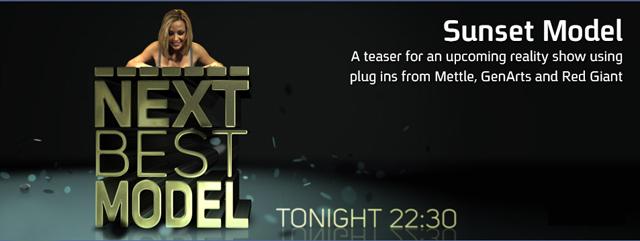
Eran Stern has a new After Effects tutorial posted on his site. It’s a teaser for an upcoming reality show created with stock footage from artbeats.com. It incorporates plug ins from Mettle, GenArts and Red Giant, with some tricks in After Effects, to create a fun, fresh piece. Great job Eran!


Don’t Wait, Create!


FreeForm V2 for CS6: Fast, Flexible and Ferocious!

As you may have noticed, FreeForm is no longer bundled in CS6. Luckily, a much faster version, FreeForm V2, is available for CS5 and CS6, at mettle.com.


Of course, all projects created with the version of FreeForm that came bundled with CS5 can be opened with FreeForm V2.

FreeForm V2 is a must-have 3D mesh-warp plug-in for After Effects. FreeForm V2 still offers waaay more functionality than the built-in bendable layer in CS6. Howz that you ask?


1) Waaay more control of the layer that you want to bend, twist and distort.

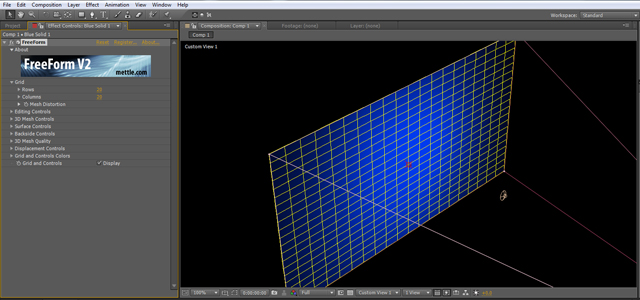
FreeForm V2 displays up to 20 x 20 control points along each edge of your plane = 400 tangent control points! Kinda like AE’s Mesh Warp, but in 3D. Sick…

All control points and tangents are displayed in the AE comp window, and can be manipulated and animated in 3D. Woohoo!


2) 3D Displacement Mapping:

Use a layer’s luminance values to push in or pull out a 3D image on the z-axis! Animate it over time… Yowza!


Don’t Wait, Create!


FreeForm V2 Used for 3D Morphing in Evolution of Style

This sequence was created entirely in After Effects, by Morgan Préleur at noside.fr, using the FreeForm V2 plug-in. Here at mettle, we are often asked how FreeForm was used in this sequence. Here is what Morgan Préleur has to say:

Re:Flex was used for the body alignments and face morphing while mettle’s Freeform V2 handled all the clothes folding (shirts tearing apart, jacket wrapping, helmet transformation, and so on…). Freeform V2 really proved to be an incredible tool and allowed us to achieve complex 3D deformations under tight deadlines. FreeForm’s ability to handle a lot of surface points while remaining totally interactive allows for a more creative and iterative process, we can experiment and come up with improved solutions which is crucial when speed is the key factor. It is a must have in our tool set for upcoming commercial works.
 

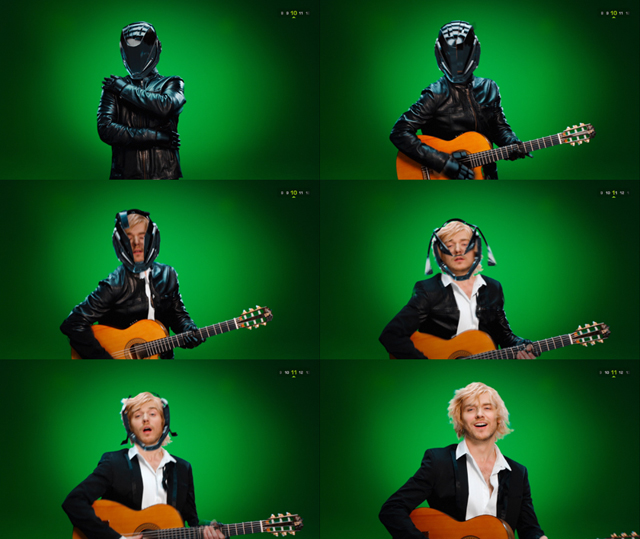
The easiest way to see how the morphing is done is to look at the sequence frame by frame. We have taken 6 frames from the sequence to illustrate this point. The movements are well choreographed between the actors, and you can see how the footage is bent and morphed.

FreeForm V2 allows you to bend layers on the X,Y + Z axis via control points and tangents that are displayed for use in the After Effects comp window. This makes FreeForm V2 the most flexible and intuitive way to deform an After Effects layer, bar none! Add to that, the 3D displacement mapping feature found in FreeForm V2, and you can get some incredible effects right in After Effects.


FreeForm V2 is available for MAC and Windows, for CS5 and CS6.